Idle game for Garmin watches
Planet-walk is an idle walking game I built for Garmin watches: your real-world steps grow things — a worm, a flower, a tree, a lake, a mountain — on one of 50 procedurally-themed planets. Finish growing something and you earn points, which unlock new biomes, buy a permanent step-cost reducer, or restore the whole planet and move on to the next one. There's no background execution on a Garmin watch, so all of this ticks along only while the app is open — which turned out to matter for more than one design decision in this post.
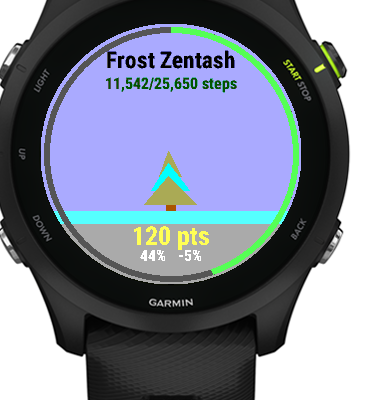
50 planets × 10 grow-items per planet is 500 things to grow. Every one already had a unique invented name (Frost Zentash, Ember Grovak, and so on) care of an earlier update. But visually, every tree was the same triangle on a trunk. Every worm was the same row of green dots. The names were unique; the shapes weren't. v1.8.6 closes that gap: all 500 items are now visibly distinct — different colors, different shape variants, different little details.
The constraint: a 64-color cube
A lot of the watches this runs on have MIP (memory-in-pixel) or transflective displays — the kind that stay visible in direct sunlight without a backlight. Their color reproduction is rough: only colors whose R/G/B channels each land on 0x00 / 0x55 / 0xAA / 0xFF (a 64-color cube) render cleanly. Anything off that grid dithers into a muddy mess. So "just generate a random hue per item" was never on the table — every color used anywhere in the game, including all 500 item colors, has to come from that cube, and has to avoid clashing with whatever sky/ground palette that item's planet already uses.
Deriving 500 styles from one function
Rather than hand-authoring 500 styles, Planets.itemStyle(planetIndex, slot) derives one deterministically from a flat index. Same planet, same slot, always the same look — no extra state to save, nothing that can drift out of sync with the name generator:
function itemStyle(planetIndex, slot) as Dictionary {
    var bodies = [
        0xFF55AA, 0x55FF55, 0x55AAFF, 0xFFAA00, 0xAA55FF, 0xFFFF55,
        0xFF5555, 0x00AAAA, 0xAAFF55, 0xFFAAFF, 0x5555FF, 0xAAAA55,
        0x55FFAA, 0xFF00FF, 0xAA5555, 0x55FFFF
    ];
    var details = [ /* ...13 more cube-safe colors... */ ];
    var pal = palette(planetIndex);
    var h = planetIndex * 10 + slot;

    var bi = (h * 3) % bodies.size();
    for (var k = 0; k < bodies.size(); k += 1) {   // never blend into sky/ground
        if (bodies[bi] != pal[0] && bodies[bi] != pal[1]) { break; }
        bi = (bi + 1) % bodies.size();
    }
    var di = (h * 2) % details.size();
    for (var k = 0; k < details.size(); k += 1) {  // and stay off the body color
        if (details[di] != bodies[bi] && details[di] != pal[0] && details[di] != pal[1]) { break; }
        di = (di + 1) % details.size();
    }

    return {
        :body    => bodies[bi],
        :detail  => details[di],
        :variant => h % 4,           // shape family within the kind
        :mark    => (h / 3) % 3,     // 0 none, 1 spots/extra, 2 stripe/leaf
        :count   => 3 + (h / 7) % 4, // body segments (worms)
        :phase   => h % 7            // idle-animation offset
    };
}
The two little rejection loops matter more than they look: without them, a bright pink item body will occasionally land on a planet whose sky is that same pink, and the item just disappears against the background. Cheap insurance against an ugly random collision.
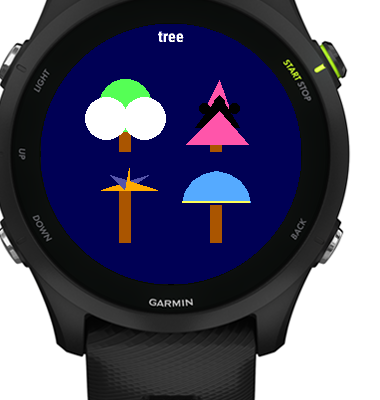
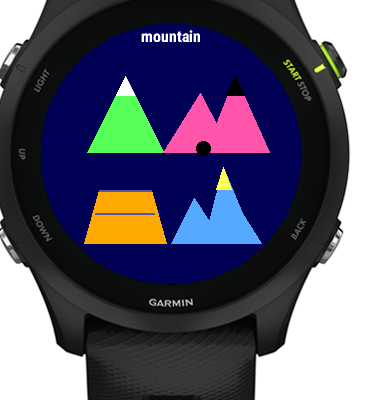
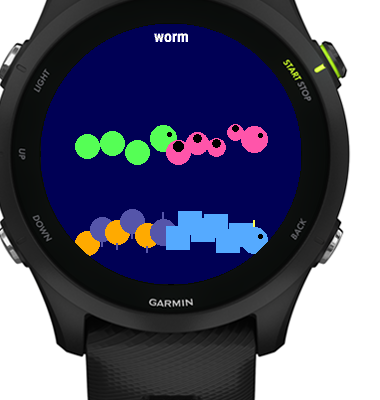
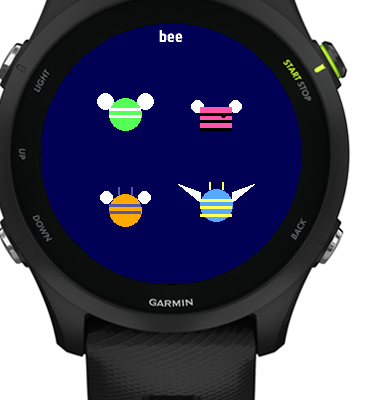
On the drawing side, MainView's single "draw a tree" / "draw a worm" function got split into one helper per creature kind, each reading variant and mark to pick between four shape families and an optional detail. Trees can come out conifer, palm, dome, or a four-frond starburst; mountains as a single snow-capped peak, twin peaks, or a flat-topped mesa; animals get horns, long ears, spots, or stripes; ponds get lily pads or a bubbling spring. Same itemStyle() call, four genuinely different silhouettes per kind:
Not recomputing it 15 times a second
The grow screen runs an idle animation timer at roughly 15fps for the whole time it's open. The item you're growing only ever changes when you switch screens, not frame to frame — so itemStyle() is computed once when the view is shown and cached, not re-derived every tick. The same cached style gets handed to the completion-burst animation when you finish growing something, so the burst matches the shape you were just looking at instead of re-rolling into a different one.
The grow list also got a small color swatch next to each item name — a preview of what you're about to grow — but only when the label has room for it. Round watch screens are unforgiving about text width, and a swatch that forces truncation is worse than no swatch.
Verifying it without eyeballing 500 items
I'm not manually checking 500 combinations by hand. The unit test suite (15/15 passing) covers the deterministic parts — same inputs always produce the same style, colors never collide with a planet's own palette. For the actually-rendered shapes, I drove every kind × variant combination through the simulator and screenshotted the grid — that's where the gallery images above come from.
This shipped alongside a smaller fix that had been sitting uncommitted: restoring a planet used to discard any points banked above that planet's restore goal. Since restoring is a manual, deliberate action (steps only drive growth — there's no auto-restore), losing banked overflow points was just punishing good timing. Leftover points now carry over into the next planet.
If you've got a Garmin watch, Planet-walk is free on the Connect IQ Store.
Get Planet-walk on the Connect IQ Store →
And if you'd like to support this kind of tinkering directly, there's a Buy Me a Coffee link in the app's menu (and on my about page).